1. Manage your workspace
Find your files, account settings, downloads and help.
Loading...
Please wait while we load your content
Start with your dashboard, account and downloads. Then prepare a lift, review and share your work, or open Academy training. Save your work before switching tools; opening another workspace does not transfer an unsaved project.
Find your files, account settings, downloads and help.
Open your project, build the site and rigging, rehearse the sequence and prepare the documents.
Check supporting information and share the saved work with your team.
Follow a course, practise a single lift, then review your learning record.
Lift Planner Pro brings crane modelling, CAD, rigging, lift planning, simulation and engineering documentation together in one connected workflow. It is built to assist competent lifting professionals, not replace engineering judgement, manufacturer instructions or site assessment.
LIFT PLANNER PRO / MODEL SHOWCASE
Crane libraries and site references
Choose a model-specific preset or drawing block, import the surrounding map and keep the source information with your plan.
86
Grove 40 · Liebherr 21 · SANY 8 · Tadano 15 · Zoomlion 2. Ordered by manufacturer and model, with recorded ballast choices, lattice-jib combinations, offsets and hoist-rope specifications.
Manufacturer colour references, visible lettering and optional Sarens / Mammoet fleet schemes.
Browse models and setup guide3
LTM 1030-2.1, LTM 1070-4.2 and LTM 1100-5.3. Place support plans and transport elevations, choose published support settings, and retain the source drawing.
Export dynamic .lppblock files or the current pose as DXF. Hook and ballast reference entries are separate from the editable drawing library.
Learn PDF blocks and exports2D / 3D
Search UK site presets or enter coordinates. Import neighbouring map areas, model source-reported heights, edit roads and buildings, and replace mapped items with plant equipment.
Source heights, storey estimates and illustrative assumptions remain distinguishable. Map data is approximate site context.
Follow the map-import guideCurrent web features. Desktop availability depends on the installed release. Crane geometry and drawing blocks do not supply certified lifting capacities; use the exact manufacturer duty information. Map imports do not replace a site survey.
Each stage feeds the next. LPP is being built so technical data, CAD geometry, crane configuration, rigging, simulation and documentation stay connected to the same project context.
Manufacturer, model, dimensions, documents and traceable engineering values.
CAD, model and reference formats enter one engineering import pipeline.
2D and 3D workspaces for lift geometry, site information and model preparation.
Geometry becomes components, pivots, connection points and configuration data.
Configure plant, process structures, site geometry and documented loads in one scene.
Edit lift points and sling legs, connect manufacturer equipment and review calculation status.
Adjust boom, hook, slew, crane position and selected crane controls.
Review lift sequences, load movement and crane states visually in 3D.
Measurement, engineering information, clearance review and safety assistance.
Generate lift-plan, RAMS and drawing outputs from project information.
Project discussion, team messaging and shared planning information.
Learning modules and workflow training for lifting operations.
This page separates live product surfaces from work that is still being developed. The aim is a complete digital lift-planning workflow, with transparent status for every major capability.
Implemented as a visible product area or backend service in the current LPP codebase.
Usable or partly wired into the application, with refinement still expected.
Architecture and early implementation exist, but the workflow should be treated as developing.
Part of the intended direction, not presented as a finished engineering capability.
Inside the live web editor
Work with the load, its lifting points and the equipment around it. Keep geometry, manufacturer references and calculation status visible as the arrangement develops.
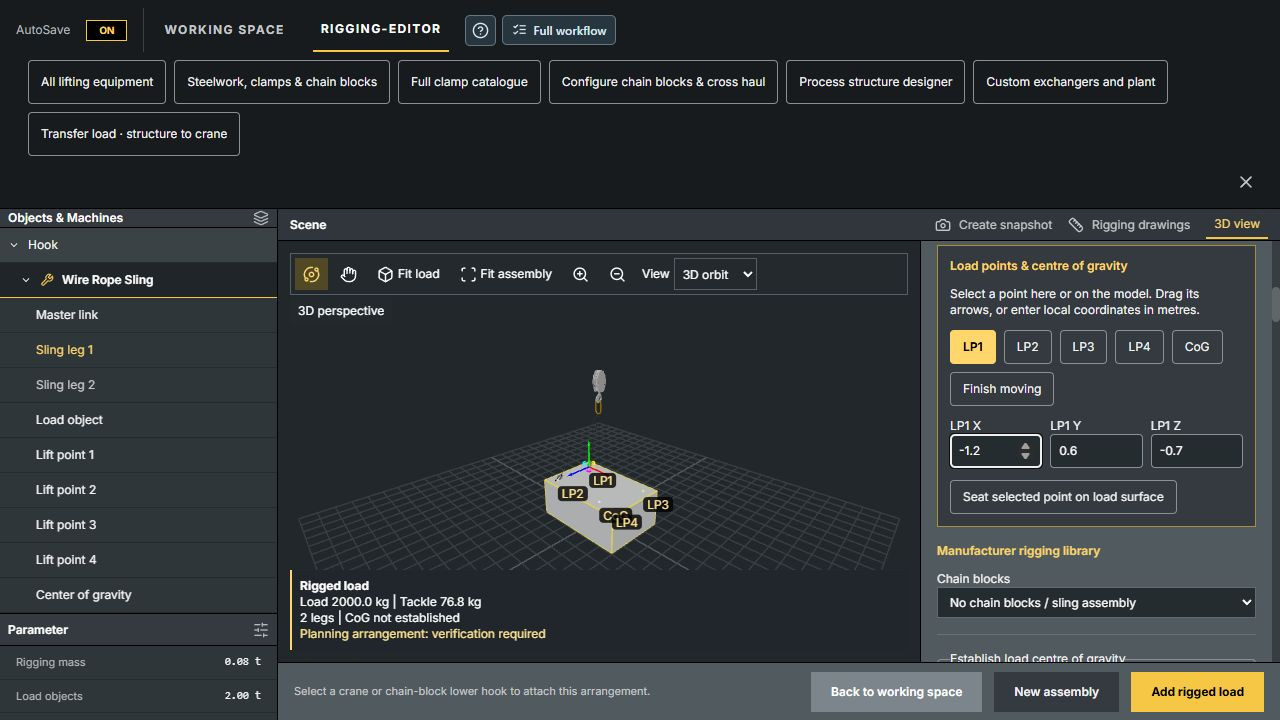
Choose a 2-, 3- or 4-leg sling configuration. Move lift points and CoG, seat a point on the load surface, and choose each leg’s attachment, material, supplied length, diameter, WLL and shackle orientation.
Add 2, 3 or 4 dimensioned planning lugs to equipment, edit their bores and plates, and seat compatible catalogue shackles. Where lugs are unavailable, use basket, choker or double-wrap hitches with separate wrap stations. Attachment resistance and hitch capacity require review.
Record whole-load CoG evidence, use fitted eyebolt connection points and review supported level-lift setups. Moving the CoG invalidates the previous evidence so it can be reviewed again.
Connected fittings follow load movement and rotation. Plan supported beam-clamp, chain-block, cross-haul and structure-to-crane transfer arrangements alongside the crane scene.
Individual-leg editing describes geometry and supplied lengths; unequal-leg force distribution is not solved. Forces and utilisation stay marked NOT SOLVED, including in drawings. Documented level-lift calculations are a separate supported mode. Transfers currently use shared rigging settings; individual-leg transfer geometry is not supported.
A digital crane is not just a visual model. It combines geometry with engineering structure so the machine can be selected, configured, moved, connected to rigging and reused across projects.
Lattice boom cranes should be assembled from real boom foot, insert and head components. LPP should not stretch a single lattice mesh to imitate different boom lengths. Valid boom configurations come from crane-specific component and reference data.
Telescopic cranes use a parent and child stage hierarchy. Extending one stage must move its descendants correctly, with extension limits and sequencing defined by the crane model rather than arbitrary visual scaling.
Model developers can use source drawings and models as the start of a controlled process: clean, scale, organise, define component types, set pivots and connection points, add technical data, test movement and save reusable crane assets.

Import manufacturer geometry, organise components, define the hierarchy, set pivots and connection points, add movement limits and configuration data, then test before saving to the crane library.
The value of the connected workflow is that project geometry, crane position, lift path, rigging, load information, hazards and responsibilities can contribute to clear lift-planning documents.

LPP is intended for people who create, review, supervise, communicate and document lifting operations.
Manage lift-planning information, review controls and produce documentation.
Develop crane arrangements, drawings, lift paths and sequences.
Work with crane configurations, reference data and component behaviour.
Visualise rigging arrangements, lifting points and load connection concepts.
Understand planned crane, load and rigging movement before work starts.
Turn manufacturer models and drawings into reusable LPP crane assets.
Build libraries of reusable digital machines and planning resources.
Demonstrate lifting concepts with interactive CAD and 3D planning tools.
One connected workflow for reference data, CAD, digital cranes, site modelling, loads, rigging, simulation, documentation and collaboration.